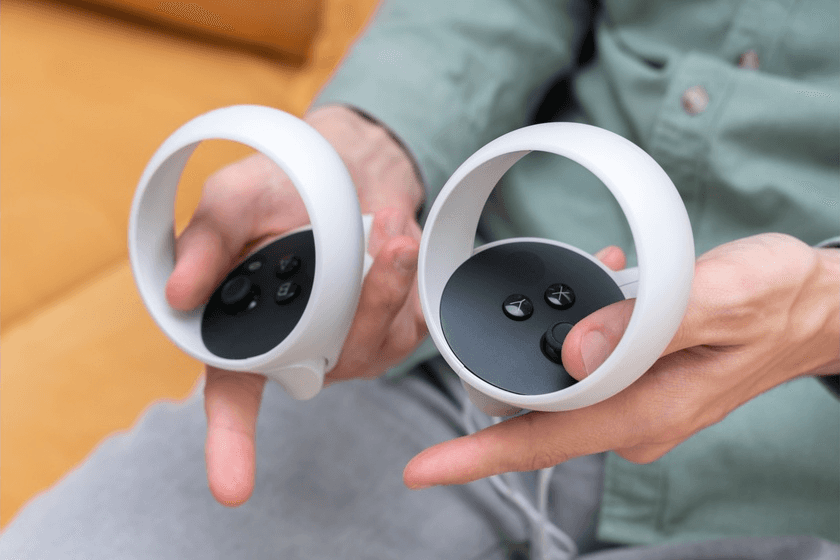
What is a VR Remote?
A VR remote is a controller held in the hand that lets people move around, pick items, and do things inside a virtual space with accuracy. Instead of just using head movements or where you look to control things, a VR remote control adds touch, motion detection, and vibrations so that what you do feels natural and correct. Current VR setups use the VR remote with a VR headset so people can point, click, grab, and move things in the digital world in a way that seems real.
How a VR Remote Works
A VR remote works by combining motion sensors, wireless connectivity, and input controls to translate a user’s physical gestures into digital actions. The VR remote control sends real-time data to the VR headset, helping the system track position, orientation, and button presses. These capabilities allow users to perform tasks like selecting menu items or interacting with 3D elements in a natural manner.
Tracking and Input Mechanisms in a VR Remote
VR remotes use sensors such as IMUs, accelerometers, and in some cases optical markers to capture positional and rotational movement with high accuracy. These parts help the remote mirror your real-world movements in the VR space with little delay. The VR headset takes this data and matches your actions to what’s happening in the virtual world, so you can handle objects or tools accurately. Advanced systems integrate inside-out tracking to remove dependency on external sensors, making movement more seamless. This level of tracking quality has become a baseline expectation for enterprise applications that require reliable hand movement mapping.
Pairing a VR Remote Control with a VR Headset
Pairing a VR remote with a VR headset is typically done via Bluetooth or a proprietary wireless protocol designed to minimize latency. Once connected, the VR headset joystick, buttons, and gesture inputs are recognized instantly by the system. Enterprises often prefer a remote control for VR headsets with reliable pairing stability to avoid disruptions during training or simulation workflows. Many VR headsets with remote pairing also offer multi-controller support, which is essential in collaborative virtual environments. Most enterprise-grade devices use encrypted communication channels to maintain secure data transmission during sessions.
Interaction Models - From Point-and-Click to VR Headset Joysticks
Interaction methods have changed from simple selections to more evolved joystick controls. A joystick on a VR headset gives users finer control in 360-degree spaces. It allows them to move, rotate items, and scroll through menus. A VR remote also allows gesture controls, like grabbing or pushing. This allows for increased involvement with training scenarios or product simulations. These interaction methods make a virtual reality remote good for learning and detailed product use. As time passes, companies have improved haptic feedback to create realistic cues that guide users as they go, boosting knowledge and accuracy.
Together, these mechanisms help the VR remote control create a more natural and responsive interface for virtual engagement, whether in professional training or entertainment applications.
Core Features of a VR Remote Control
A VR remote includes sensors, haptic modules, buttons, and wireless capabilities designed for responsive interactions. These features allow users to navigate complex virtual scenes with confidence and learn faster through tactile cues. A VR headset with remote adds an additional layer of accuracy that benefits training, simulation, and product visualization workflows.
Motion Sensors and Haptics in Virtual Reality Remotes
VR remote motion sensors pick up both linear motion and rotation, sending this data to the system. Haptic modules deliver tactile cues for impacts, tool interactions, and environmental feedback, providing a realistic sense of contact during virtual tasks. Haptics that are done well are very helpful when learning how to use equipment because the sense of touch helps you remember the steps. Studies show that haptic-enabled devices improve task recall and precision in VR training by up to 25 percent (Source).
Buttons, Joysticks, and Navigation Tools in VR Headset Remotes
Button inputs serve as direct commands for selection or confirmation, while joysticks allow directional control. A VR headset joystick is especially helpful in experiences that require locomotion within larger virtual spaces. Enterprises using VR for safety training or equipment familiarization prefer remotes with customizable buttons that align with task requirements. The button layout also influences how quickly new users adapt to the system.
Compatibility Considerations for a VR Headset with Remote
Due to differences in tracking tech, firmware, and ways of interacting, not all VR remotes work with every device. When organizations think about using remote control for VR headsets, they should check if it works with their current processes, devices, and content. Some VR remote models need their firmware to be synced, but others connect right away using regular wireless methods. These things about working together matter for companies that want to use VR across many teams.
Together, these features make the VR remote a versatile tool that supports reliable and predictable interaction across a range of enterprise and consumer applications.
Use Cases of VR Remotes Across Industries
A VR remote enables precise interaction in industries where accuracy, speed, and tactile control are essential. Tools like a virtual reality remote or a VR headset joystick help users work through simulated operations, respond to dynamic scenes, and practice equipment control in a safe environment.
Enterprise Training and Simulation
Sectors like manufacturing, energy, and aviation use VR remotes to guide workers through process training. Trainees use the VR remote control to operate virtual equipment, practice movement sequences, and navigate work areas realistically. Research shows that interactive VR training using hand-tracked or controller-based input can increase learning retention by up to 34 percent.
Gaming and Interactive Experiences
VR games depend on remotes with various controls like joysticks for movement, triggers for actions, and buttons for selections to make complex gameplay possible. A VR headset that works with a remote lets players move their characters, aim at things, grab items, and relate to the game environment accurately. A lot of the current gaming controllers also have sensors that know when your fingers are there, which makes the hand representation in the game seem more like real life.
Remote Collaboration and Virtual Workflows
In professional settings, VR remotes enable teams to explore virtual workspaces, change 3D models, and engage with shared dashboards. Teams in fields like architecture and design employ VR remote controls to change the scale, turn objects, and add notes to models as part of team reviews. The accuracy of these remotes supports faster decision-making by enabling teams to manipulate complex elements directly.
These applications show how the VR remote bridges physical and digital workflows in industries that rely on precision and interaction clarity.
The Future of VR Remotes
Future VR remote designs are expected to integrate AI-driven gesture prediction, improved haptics, and hybrid input systems. Studies on adaptive interactions permit VR remotes to change feedback based on how people act, which makes simulations seem more real. Also, developers are trying out finger-tracking that mixes the good parts of a remote with the normal feeling of hand motion. These changes will cause VR remotes to be more flexible, which lowers problems during teaching and shortens the time it takes for new users to get started.
Exploring VR Solutions?
Talk to AutoVRse to design VR experiences optimized for remote-driven workflows.
